
Name Decorator: Copy Cute Aesthetic Name Styles
This tool wraps your name in symbols that match your mood. Type one word, then copy a heart, bow, star, gothic or minimal frame for your profile.
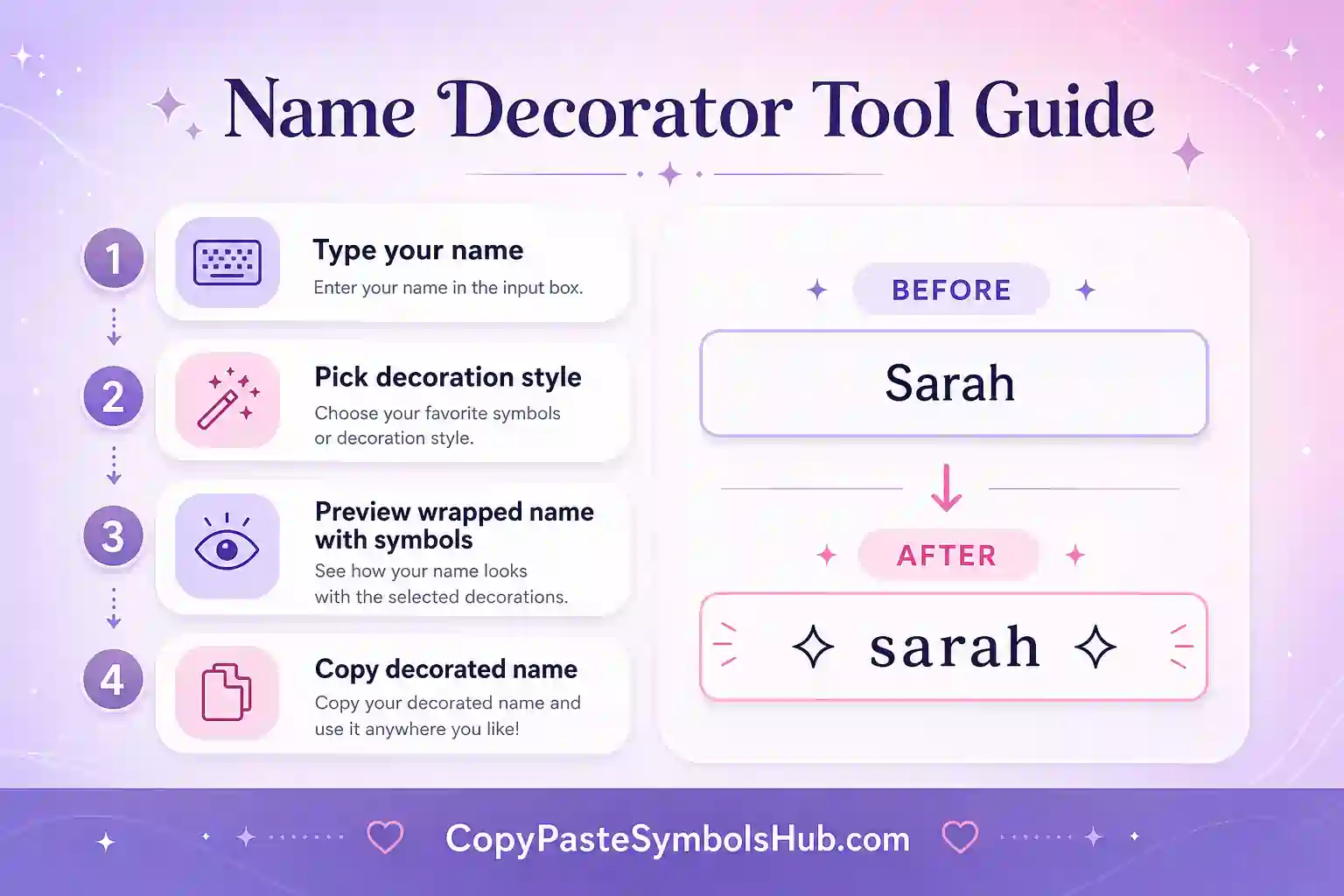
How to Use the name styling tool
Type your name, nickname or display name first. Then pick a frame that fits the platform. A soft bow works well for coquette profiles. A star frame fits Y2K pages. A clean bracket works better for a simple username.
Let me be real with you, too many symbols can make a name hard to read. Keep the name clear in the middle. Use the decoration like a frame, not a wall.
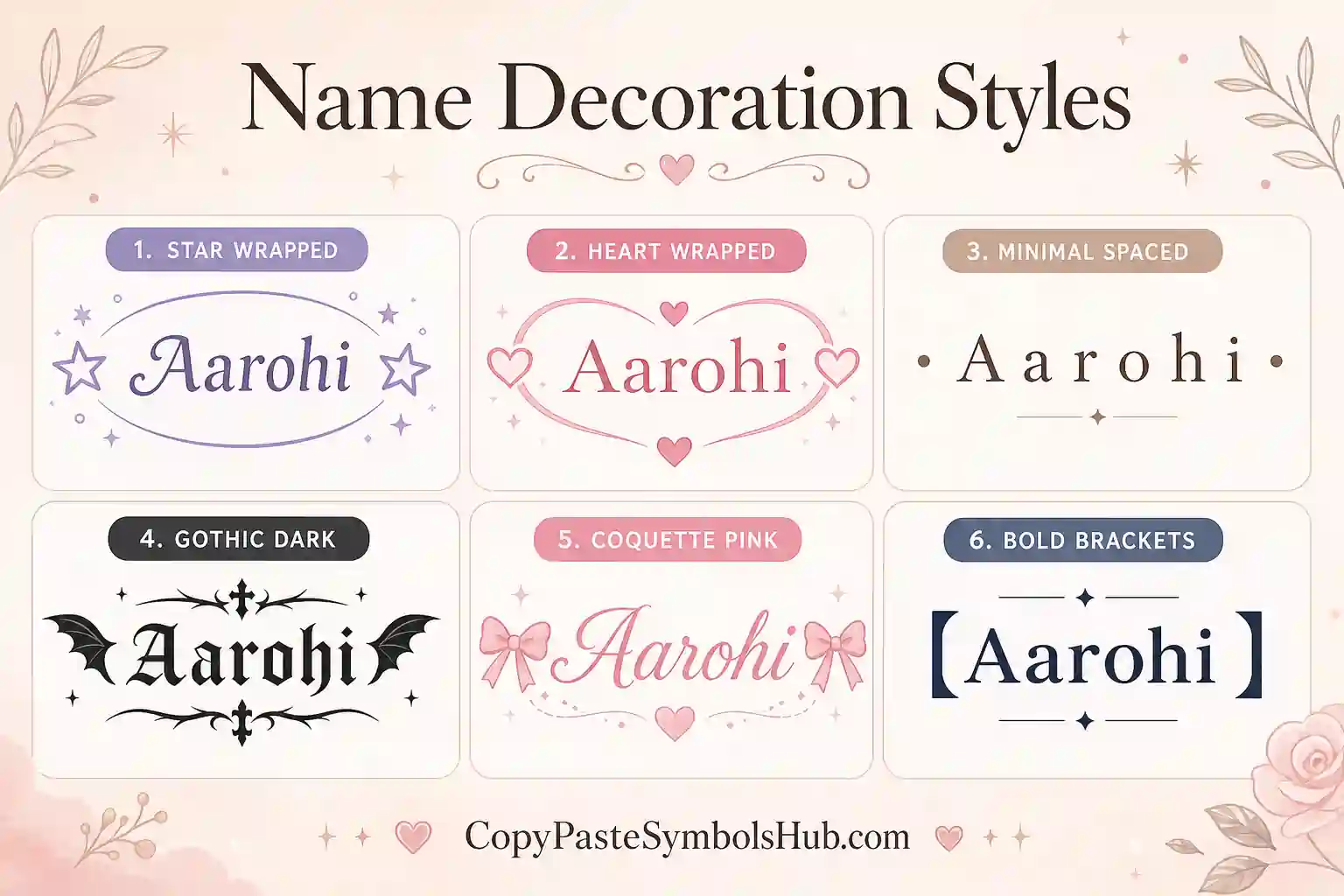
Name Decoration Styles Explained
Heart frames feel warm and friendly. Bow frames fit coquette profiles. Star frames fit Y2K and creator pages. Gothic frames fit dark bios and gaming tags.
Keep the name in the center readable. Decoration should frame the word, not hide it.
Where Decorated Names Work Best
| Field | Works well? | Notes |
|---|---|---|
| Instagram display name | Yes | Short frames render best on mobile. |
| Discord nickname | Yes | Server nicknames accept most Unicode marks. |
| Permanent username | Sometimes no | Use decoration in display fields instead. |
| WhatsApp name | Yes | Keep symbols minimal for clarity. |
display name wrapper Frames Explained
Heart frames feel warm for friends lists and soft profiles. Bow frames signal coquette and ribbon aesthetics. Star frames match Y2K boards and bright creator pages. Gothic frames fit gaming clans and dark bios.
Each frame in the tool wraps one word you type. Copy the result, then paste into the display name field on your app of choice.
Best Apps for Decorated Display Names
Instagram display names, Discord server nicknames, TikTok profile names, and WhatsApp contact names accept most Unicode frames. Roblox display names often work while permanent usernames may not.
Business pages should use minimal brackets only. Heavy symbols can reduce trust when customers search your brand.
Common name styling tool Mistakes to Avoid
Do not stack three different frames on one name. One decoration layer is enough. Do not replace every letter with symbols. Keep the core name readable in search and voice chat.
If a frame shows as a box on your device, switch to hearts, stars, or simple brackets that older phones render reliably.
Extended Platform Playbook
This section maps real workflows for a name decorator across apps people use daily.
Instagram: optimize display name first, bio second, highlights third. TikTok: prioritize nickname width. Discord: optimize about me and server nick.
WhatsApp and Telegram status lines reward single accents. YouTube channel descriptions allow longer prose but still benefit from one styled hook.
| App | Field to style | Word budget | Tip |
|---|---|---|---|
| Display name | Short | One styled phrase | |
| TikTok | Nickname | Very short | Test mobile clip |
| Discord | Server nick | Medium | Bold scans well |
| X | Name | Medium | Keep handle plain |
| Headline | Medium | Minimal styling |
Copy-Paste Workflow for Busy Creators
Batch profile edits on one day each month. Generate three variants. Pick the clearest. Schedule posts that match the new bio tone.
When a post goes viral, update the bio CTA while attention is high. Tools on this page speed that edit.
Troubleshooting Guide
Problem: boxes instead of letters. Fix: simpler Unicode set. Problem: bio truncated. Fix: shorter divider. Problem: looks spammy. Fix: remove half the symbols.
Glossary of Terms
Unicode text: characters that look styled but remain copyable text. Display name: visible label, often separate from handle. Divider: decorative line splitting bio sections.
Quality Standards for SEO Content
Useful pages teach layout, limits, and mistakes—not just output buttons. Edit every result. Add personal facts. Read aloud before publish.
Complete Guide to Using name styling tool on Social Media
Start with plain text. Add one display name wrapper element. Test on mobile. Save when the line still reads in one breath.
Profiles that convert share identity fast. Decoration supports words; it does not replace them.
Reuse a small set of marks across platforms so your brand feels consistent instead of random.
| Step | Action | Why |
|---|---|---|
| 1 | Write base bio text | Clarity first |
| 2 | Pick one symbol or tool output | Tone second |
| 3 | Paste and count characters | Avoid truncation |
| 4 | Screenshot on phone | Catch wrap issues |
| 5 | Publish and revisit monthly | Stay current |
Audience Psychology and Profile Scannability
Visitors decide in seconds. Lead with who you are, what you post, or why to follow.
Symbols guide the eye but words carry meaning. Balance both for trust and aesthetic.
Editing Checklist Before You Go Live
Read aloud once. Remove one symbol if you stumble. Confirm niche is obvious. Confirm CTA or link still fits.
Tool Output Examples Explained
Example A: styled name only — best for display fields. Example B: full bio line — edit every bracket. Example C: divider plus name — split layout for Instagram.
| Output type | Edit priority | Platform |
|---|---|---|
| Styled word | Check readability | TikTok name |
| Bio block | Add personal fact | |
| Divider line | Keep under 20 chars | Discord |
Privacy, Safety, and Best Practices
Do not paste sensitive data into browser tools. Use styled text for public profiles only.
Avoid impersonating brands or creators with near-identical styled names.
Integration With Symbol Collection Pages
After using this tool, browse heart, star, bow, or aesthetic symbol pages to add one manual accent mark.
Future Profile Updates
Bookmark this page for seasonal refreshes. Small tool-based edits keep profiles current without full redesigns.
Research Notes on Tool Searches
Users who search for a name decorator want speed, mobile compatibility, and copy-ready examples without signup walls.
Strong tool pages explain platform limits, show comparison tables, and list mistakes. That keeps readers on page longer.
Always edit generated output. One personal detail beats a perfect symbol layout with zero context.
Mobile-First Testing Checklist
Draft on desktop if you want, but preview on the phone you post from. iOS and Android render Unicode differently.
Screenshot the final profile at arm’s length. If you squint, remove one decoration layer.
| Check | Goal | If it fails |
|---|---|---|
| Readable name | Friend can say it aloud | Remove symbols |
| Char limit | Full bio visible | Shorten divider |
| No box glyphs | All letters show | Simpler style |
| Niche clear | 5-second scan | Edit words first |
Free Copy Tools vs Paid Design Apps
Paid apps offer depth but slow quick bio edits. Copy-paste tools win when you need one change before posting.
This name decorator stays free with no login so you can iterate until the profile feels right.
Workflow With Other Site Pages
Pair this tool with symbol collection pages for manual marks. Use bio templates when you need full lines instead of styled fragments.
Common Questions Before You Copy
Ask if the styled text fits the platform limit. Ask if friends can read it quickly. Ask if it matches your current aesthetic era.
If any answer is no, simplify before you publish.
Profile Refresh Calendar
Many creators refresh bios at season changes, after milestones, or when switching content niches. Save this page for those moments.
name styling tool for Email Signatures
Some email clients strip Unicode frames. Test Outlook and Gmail before using decorated names in signatures.
Family and Couple Matching Names
Couples pick matching bracket styles with different names. Families use one frame type across sibling accounts.
Quick Compare: Decorator vs Manual Copy
Manual symbol pages offer more marks. The decorator saves time when you want instant frames for one word.
What Name Decoration Does for Profiles
A display name wrapper wraps one word in a symbol frame. Hearts feel warm. Bows feel coquette. Stars feel Y2K. Gothic frames fit dark gaming tags.
Decoration should highlight the name, not replace it. Keep the center word readable for search and voice chat.
name formatter Step-by-Step
Type your name or nickname. Review the frame list. Tap to copy. Paste into Instagram display name, Discord nickname, or WhatsApp contact name.
Test the name frame tool output on a phone. Long frames clip in narrow fields.
| Frame | Mood | Best field |
|---|---|---|
| Heart | Friendly | Instagram display |
| Bow | Coquette | TikTok profile |
| Star | Y2K | Creator pages |
| Gothic | Dark | Discord nick |
Business vs Personal Name Decoration
Personal profiles can carry cute frames. Business pages should use minimal brackets only. Trust drops when brand names hide inside symbol walls.
Seasonal Name Frame Ideas
Valentine frames use hearts. Coquette seasons use bows. Halloween uses gothic brackets. Swap frames when your feed mood shifts.
Name Decorator for Group Chats
Friend groups pick one frame style per season so everyone matches in group lists. Copy the same bracket type from this tool.
Voice Chat Readability
If teammates cannot say your decorated name aloud, simplify the frame. Clarity beats aesthetic in ranked games.
Combining With Username Generator
Generate base username ideas first, then run the winner through the name decorator for a final frame.
Save two decorated versions of your name and switch between them when your profile mood changes. Small updates keep your page fresh without a full rebrand.
Display Name Frames by Mood
Heart frames read romantic and friendly. Bow frames signal coquette and ribbon aesthetics. Star frames match Y2K and bright creator pages. Gothic brackets fit gaming clans and dark bios without hiding the core word.
Type one word in the tool, copy the framed result, paste into the display name field. If boxes appear on your phone, switch to simpler brackets from the heart or star symbol pages.
| Frame | Signal | Platform fit |
|---|---|---|
| Hearts | Warm, soft | Instagram, WhatsApp |
| Bows | Coquette | TikTok, Pinterest |
| Stars | Y2K / pop | TikTok, Discord |
| Gothic | Dark mood | Discord, gaming |
Framing One Word vs Full Phrases
This name decorator works best on a single word or short nickname. Long phrases clip on TikTok and WhatsApp status fields. If you need a full line, use the bio generator or profile bio templates instead.
Try the decorated name in dark mode and light mode on your phone. Some frames look bold on white backgrounds but disappear on black Discord themes.
Pairing With Font Generator Output
Style the core word with the font generator first, then wrap it with a frame from this tool only if both render cleanly on your device. Two decoration layers max keeps the name readable.
Quick Copy Checklist for Display Names
Before you save, confirm the framed name fits the character limit, renders without box glyphs, and still sounds natural when a friend says it aloud. If any step fails, pick a simpler frame from the results above.
Bookmark this page when you rebrand or switch aesthetic eras. A five-minute name refresh can match a new content theme without rebuilding your whole profile.
Frames That Work on Older Phones
Hearts, stars, and simple brackets usually render on older Android builds. Rare Gothic brackets may show as boxes. When that happens, copy a frame from the heart or star symbol pages instead.
When Not to Decorate Your Name
Job applications, client-facing LinkedIn pages, and support accounts should stay plain. Decoration fits creator, gaming, and personal aesthetic profiles where personality matters more than formal trust signals.
If your name is already long, skip frames entirely. A clipped display name hurts discoverability more than a plain spelling helps aesthetics.
Saving Favorite Frames for Later
Copy three frames you like into a notes app grouped by mood: soft, Y2K, and gothic. Switch between them when you refresh your profile without rebuilding from scratch each time.
Use name decorator after your niche line is clear, not before.
A light touch of name decorator keeps the profile readable on mobile.
Test name decorator on your phone before you save the final layout.
Save your favorite name decorator options in notes for quick refreshes.
If the line feels crowded, remove one accent from name decorator and keep the words.
Friends scan faster when name decorator frames the message instead of covering it.
Match name decorator to the platform character limit before you publish.
Reuse the same name decorator style across bio and display name for consistency.
Edit after you paste so name decorator still sounds like you.
Short fields reward simple name decorator more than long ornament chains.
Older devices render basic name decorator more reliably than rare glyphs.
Keep business pages plain; name decorator fits creative profiles best.
One clean pick from name decorator beats five competing marks.
Related Tools
Frame names with symbols and styled text from these pages.
Quick Answers About Name Decoration
Where can I use decorated names?
Use them in display names, bios, captions, Discord nicknames and profile headings.
Can I decorate a business name?
Yes, but use a clean frame and avoid heavy symbols that hurt trust.
Will every app accept these names?
Most apps accept them in display fields. Some apps block symbols in permanent handles.
What style is easiest to read?
Minimal brackets, stars and simple hearts stay the easiest to read.
Is this name styling tool free?
Yes. Every result is free to copy and edit.