
Bio Generator: Copy Aesthetic Bios for Instagram, TikTok and Discord
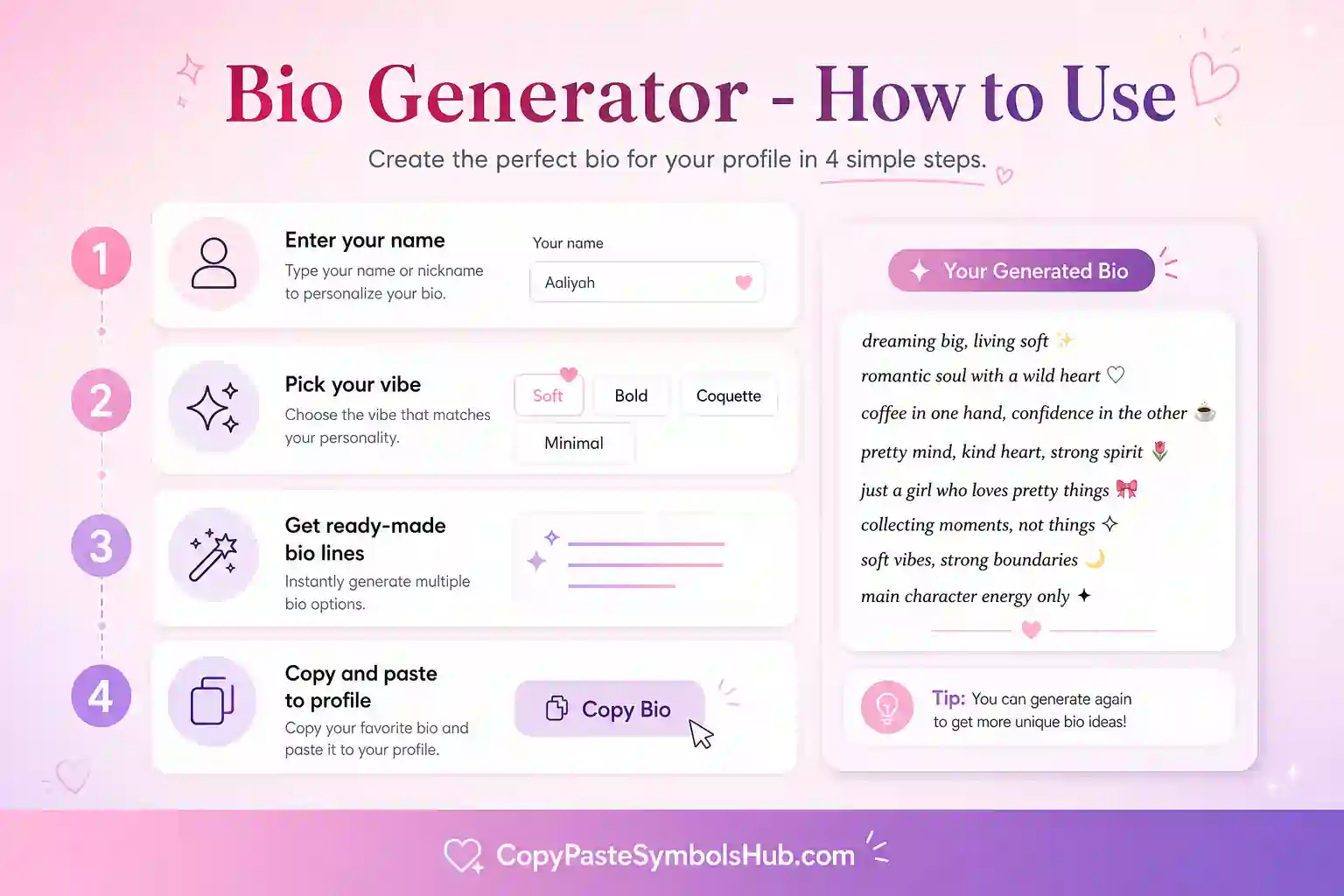
This bio generator gives you a strong starting line when your profile feels blank. Add a name, choose a vibe, and copy a short layout you can edit in seconds.
Why This profile line tool Helps
Here’s the thing, most people overthink a bio because the space feels tiny. A generator gives you a frame first. You still add your own detail, but you do not start from an empty box.
Use the output as a draft, not a final mask. Change the hobby, city, job title or inside joke so the line sounds like you. That small edit makes the bio feel real.
Best Places to Use Generated Bios
Instagram needs short lines with a clear vibe. TikTok works better with punchy words. Discord can hold a little more personality. Dating apps need one real detail that starts a conversation.
What Makes a Strong Generated Bio
A good bio shares one clear detail, one mood, and one reason to follow or message you. Symbols should support that message, not replace it.
Edit every generated line. Add your city, job, hobby, or fandom so the result sounds personal instead of copied.
bio maker Use Cases by App
| App | What to generate | Limit |
|---|---|---|
| Short vibe line plus niche | 150 characters | |
| TikTok | Punchy one-liner | 80 characters |
| Discord | Personality plus status hint | 190 characters |
| Dating apps | One hobby plus one hook | Varies by app |
How to Edit Generated Bios for Each Platform
Instagram bios need a clear niche in the first line. TikTok favors punchy words under 80 characters. Discord allows more personality and status hints. Dating apps need one hobby that starts a conversation.
After you copy a result, swap bracket words for real details. Add your city, artist, game rank, or job title so the line sounds lived-in instead of generic.
bio writing tool Tips From Profile Trends
Soft bios lead with mood words like calm, cozy, or slow mornings. Gothic bios use one dark symbol and a short phrase. Gaming bios name the main title first. Professional bios skip heavy emoji unless your brand is playful.
Read the bio out loud before saving. If it takes more than three seconds to understand, trim a symbol or shorten a clause.
When to Use Symbols in a Generated Bio
One heart, star, or bow is enough for most profiles. Symbols should frame your message, not replace it. Save divider lines for the space between your name and your link or CTA.
If your app shows a character count, paste the full bio first. Then remove marks from the end until you fit the limit without cutting your main detail.
Extended Platform Playbook
This section maps real workflows for a bio generator across apps people use daily.
Instagram: optimize display name first, bio second, highlights third. TikTok: prioritize nickname width. Discord: optimize about me and server nick.
WhatsApp and Telegram status lines reward single accents. YouTube channel descriptions allow longer prose but still benefit from one styled hook.
| App | Field to style | Word budget | Tip |
|---|---|---|---|
| Display name | Short | One styled phrase | |
| TikTok | Nickname | Very short | Test mobile clip |
| Discord | Server nick | Medium | Bold scans well |
| X | Name | Medium | Keep handle plain |
| Headline | Medium | Minimal styling |
Copy-Paste Workflow for Busy Creators
Batch profile edits on one day each month. Generate three variants. Pick the clearest. Schedule posts that match the new bio tone.
When a post goes viral, update the bio CTA while attention is high. Tools on this page speed that edit.
Troubleshooting Guide
Problem: boxes instead of letters. Fix: simpler Unicode set. Problem: bio truncated. Fix: shorter divider. Problem: looks spammy. Fix: remove half the symbols.
Glossary of Terms
Unicode text: characters that look styled but remain copyable text. Display name: visible label, often separate from handle. Divider: decorative line splitting bio sections.
Quality Standards for SEO Content
Useful pages teach layout, limits, and mistakes—not just output buttons. Edit every result. Add personal facts. Read aloud before publish.
Complete Guide to Using the profile line tool on Social Media
Start with plain text. Add one profile line tool element. Test on mobile. Save when the line still reads in one breath.
Profiles that convert share identity fast. Decoration supports words; it does not replace them.
Reuse a small set of marks across platforms so your brand feels consistent instead of random.
| Step | Action | Why |
|---|---|---|
| 1 | Write base bio text | Clarity first |
| 2 | Pick one symbol or tool output | Tone second |
| 3 | Paste and count characters | Avoid truncation |
| 4 | Screenshot on phone | Catch wrap issues |
| 5 | Publish and revisit monthly | Stay current |
Audience Psychology and Profile Scannability
Visitors decide in seconds. Lead with who you are, what you post, or why to follow.
Symbols guide the eye but words carry meaning. Balance both for trust and aesthetic.
Editing Checklist Before You Go Live
Read aloud once. Remove one symbol if you stumble. Confirm niche is obvious. Confirm CTA or link still fits.
Tool Output Examples Explained
Example A: styled name only — best for display fields. Example B: full bio line — edit every bracket. Example C: divider plus name — split layout for Instagram.
| Output type | Edit priority | Platform |
|---|---|---|
| Styled word | Check readability | TikTok name |
| Bio block | Add personal fact | |
| Divider line | Keep under 20 chars | Discord |
Privacy, Safety, and Best Practices
Do not paste sensitive data into browser tools. Use styled text for public profiles only.
Avoid impersonating brands or creators with near-identical styled names.
Integration With Symbol Collection Pages
After using this tool, browse heart, star, bow, or aesthetic symbol pages to add one manual accent mark.
Future Profile Updates
Bookmark this page for seasonal refreshes. Small tool-based edits keep profiles current without full redesigns.
Research Notes on Tool Searches
Users who search for a bio maker want speed, mobile compatibility, and copy-ready examples without signup walls.
Strong tool pages explain platform limits, show comparison tables, and list mistakes. That keeps readers on page longer.
Always edit generated output. One personal detail beats a perfect symbol layout with zero context.
Mobile-First Testing Checklist
Draft on desktop if you want, but preview on the phone you post from. iOS and Android render Unicode differently.
Screenshot the final profile at arm’s length. If you squint, remove one decoration layer.
| Check | Goal | If it fails |
|---|---|---|
| Readable name | Friend can say it aloud | Remove symbols |
| Char limit | Full bio visible | Shorten divider |
| No box glyphs | All letters show | Simpler style |
| Niche clear | 5-second scan | Edit words first |
Free Copy Tools vs Paid Design Apps
Paid apps offer depth but slow quick bio edits. Copy-paste tools win when you need one change before posting.
This bio writing tool stays free with no login so you can iterate until the profile feels right.
Workflow With Other Site Pages
Pair this tool with symbol collection pages for manual marks. Use bio templates when you need full lines instead of styled fragments.
Common Questions Before You Copy
Ask if the styled text fits the platform limit. Ask if friends can read it quickly. Ask if it matches your current aesthetic era.
If any answer is no, simplify before you publish.
Profile Refresh Calendar
Many creators refresh bios at season changes, after milestones, or when switching content niches. Save this page for those moments.
A/B Testing Your Generated Bio
Run two bio variants for two weeks if analytics allow. Keep the version that gets more profile clicks or DMs.
bio maker for Link-in-Bio Pages
Match bio tone to landing page promise. If bio says cozy reader, link page should show books or soft branding.
Multilingual Bios
Keep non-English bios plain when styled Unicode fails for your alphabet. Use symbols sparingly beside local script.
What a Bio Generator Solves
A profile line tool removes blank-page stress. You enter a name, interest, and vibe. The tool returns framed lines you edit into something personal.
Generated bios are drafts, not finals. Add city, job title, fandom, or humor so the line sounds like you spoke it.
bio maker Tutorial
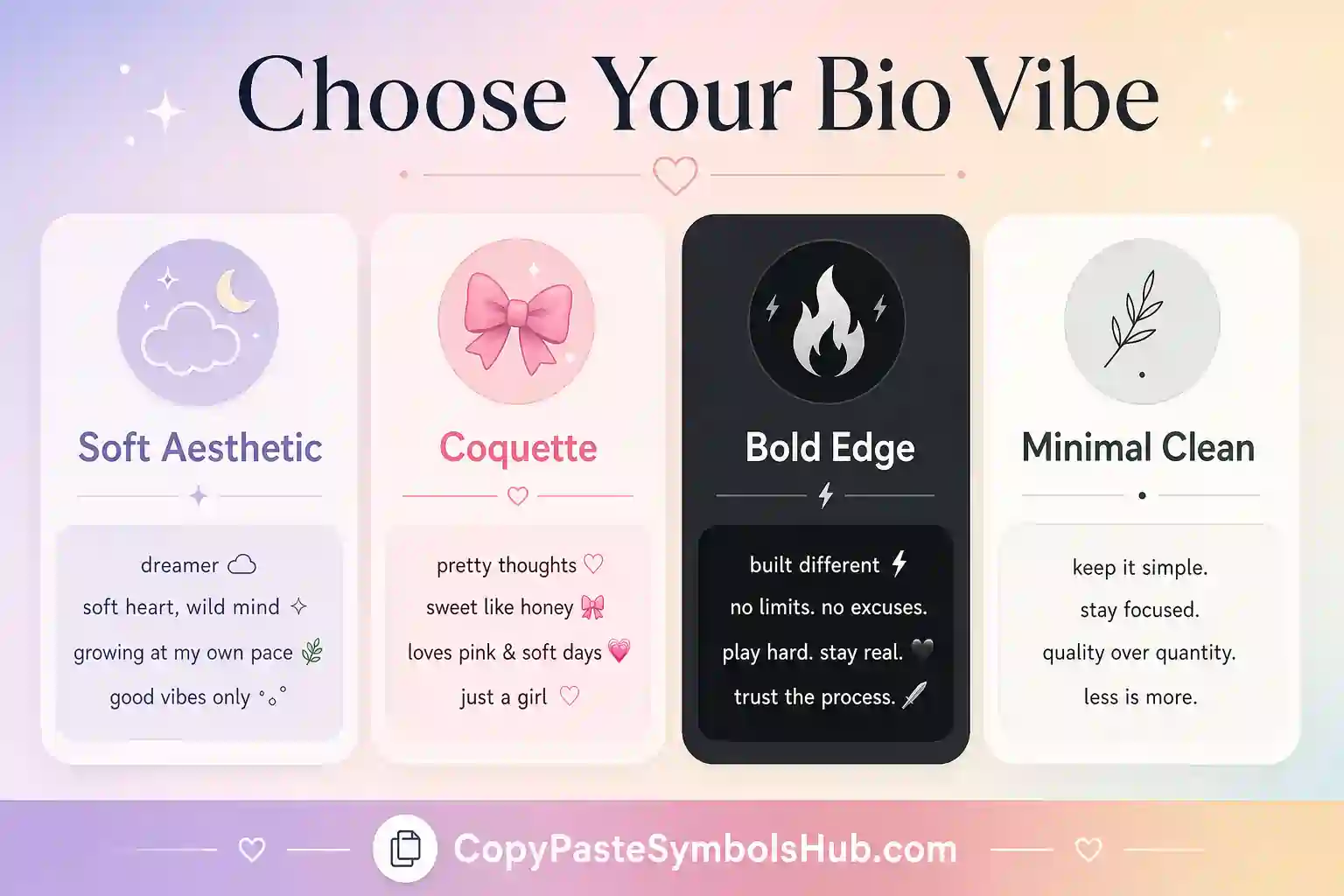
Fill the name field with your display name or nickname. Add one hobby or niche in the interest box. Choose soft, gothic, gaming, professional, or dating vibe. Tap a result to copy.
Paste into Instagram, TikTok, Discord, or dating apps. Trim symbols if you hit the character cap.
| Vibe | Tone | Edit tip |
|---|---|---|
| Soft | Warm, calm | Add a city or coffee detail |
| Gothic | Dark, quiet | One dark symbol only |
| Gaming | Direct, casual | Name your main title |
| Professional | Clear, plain | Skip heavy emoji |
| Dating | Friendly hook | Add one conversation starter |
bio writing tool by Platform
Instagram: lead with niche, keep under 150 characters. TikTok: one punchy line. Discord: add personality and status hint. Dating: one hobby plus one hook beats a symbol wall.
The bio generator speeds the first draft. Templates on the bio templates page help when you want copy-ready layouts instead.
Symbols Inside Generated Bios
One heart, star, or bow supports the message. Six symbols replace the message. Edit generated output until a friend can explain your profile in five seconds.
Bio Writing Psychology
Profiles convert when visitors grasp identity in three seconds. Lead with who you are or what you post. Mood words come second. Links last.
A bio generator helps when you stare at a blank box. It gives structure so you edit instead of invent from zero.
Examples by Search Intent
Soft intent: cozy, calm, slow mornings. Gothic intent: quiet, heavy heart, dark playlists. Gaming intent: rank, main game, no drama.
Professional intent: role, value, contact path. Dating intent: hobby hook plus light humor.
| Intent | Sample opening | Edit this |
|---|---|---|
| Soft | soft heart, loud dreams | Add your hobby |
| Gothic | quiet mind, heavy heart | Name your artist |
| Gaming | ranked player, chill lobbies | Add your title |
| Creator | building in public | Name your niche |
Mobile Editing Tips
Draft in Notes if your app eats line breaks. Paste once into the bio field. Count characters in Instagram settings before you publish.
When Not to Use a Generator
Skip generated lines for medical, legal, or emergency contact bios. Use plain text when clarity outweighs aesthetic.
Real Bio Examples You Can Adapt Today
Soft creator: slow mornings · book girl · ♡ your next cozy read. Fitness coach: strength · form first · DM for plans. Music page: new drops Fri · playlist in bio · 🎧. Each line leads with identity, then adds one symbol if space allows.
Swap the niche words for yours. Keep one divider or heart. Paste into Instagram first, then mirror the tone on TikTok with a shorter variant.
| Profile type | First line focus | Symbol use |
|---|---|---|
| Creator | Content niche | One accent max |
| Business | Service + city | Minimal or none |
| Gaming | Main game + rank | One themed mark |
| Dating | Conversation hook | Light emoji only |
Seasonal Bio Refresh Ideas
Spring bios lean soft: flowers, slow living, pastel hearts. Summer bios name travel plans or beach mood. Fall bios use cozy words and warm dividers. Winter bios fit holiday links or study season updates.
Change one line when the season shifts. Keep your handle and link stable so followers still recognize you after the refresh.
Pair seasonal words with one symbol from the heart or flower symbol pages when you want a quick visual cue without rebuilding the whole bio.
Bio Tone Matching for New Followers
Your bio should tell a stranger what you post in one scan. Lead with niche, then mood, then link. If the generated line feels vague, swap bracket words for a specific hobby, city, or creator goal.
Older devices render basic bio generator more reliably than rare glyphs.
Use bio generator after your niche line is clear, not before.
A light touch of bio generator keeps the profile readable on mobile.
Test bio generator on your phone before you save the final layout.
Save your favorite bio generator options in notes for quick refreshes.
If the line feels crowded, remove one accent from bio generator and keep the words.
Friends scan faster when bio generator frames the message instead of covering it.
Match bio generator to the platform character limit before you publish.
Reuse the same bio generator style across bio and display name for consistency.
Edit after you paste so bio generator still sounds like you.
Short fields reward simple bio generator more than long ornament chains.
Related Tools
Use these pages alongside the bio generator for symbols, fonts, and ready-made layouts.
Quick Answers About Bio Generators
How do I use this bio maker?
Type your name and interest, choose a vibe, then tap any result to copy it.
Should I edit the generated bio?
Yes. Add one real detail so it sounds personal and not copied.
Can I use it for Instagram?
Yes, but keep the final version under the Instagram bio limit.
What makes a good bio?
A good bio shares one clear detail, one mood and one reason to follow or message you.
Is the bio generator free?
Yes. You can copy every result without a login or download.